X Pay — Flexible Pay Later, Elevating Your Payment Experience
1. Introduction to X Pay
X Pay is an innovative payment service within the X Wallet App, offering a "Buy Now, Pay Later" (BNPL) payment method. Whether you are shopping online or at physical merchants, X Pay can help you split your purchase amount into three interest-free installments, with the specific payment schedule as follows:
Purchase Date
One Month Later
Two Months Later
X Pay employs advanced security technologies (including PCI certification, 3DS verification, and data encryption) to ensure every transaction is thoroughly protected. Furthermore, this service supports multiple card binding, allowing you to flexibly choose suitable credit or debit cards as payment methods, achieving a seamless payment process.
2. Benefits of X Pay
By using the X Pay payment tool, you will enjoy the following significant advantages:
Pay Later, Zero-Pressure Spending — With X Pay, the purchase amount can be automatically split into three payments (purchase date, one month later, two months later), allowing you to avoid paying the full amount at once and effectively distribute spending pressure.
0% Interest Throughout, No Hidden Fees — X Pay charges zero interest and no additional fees throughout the entire process, ensuring each installment payment has no extra burden.
Multiple Card Binding, Flexible Payment — Supports binding Visa / MasterCard credit and debit cards, and even allows card binding via Apple Pay, providing you with diverse payment options.
Secure and Reliable, Advanced Protection — This service uses PCI-certified payment gateways and 3DS verification to ensure transaction data is encrypted end-to-end, safeguarding your payment security.
Applicable for Online and Physical Stores — Whether checking out online or shopping in-store, simply scan the X Pay QR code to enjoy the convenient "Buy Now, Pay Later" service.
Exclusive Offers and Vouchers — X Pay periodically collaborates with partner merchants to launch exclusive discounts and voucher campaigns, making your purchases more affordable and valuable.
3. How to Activate X Pay
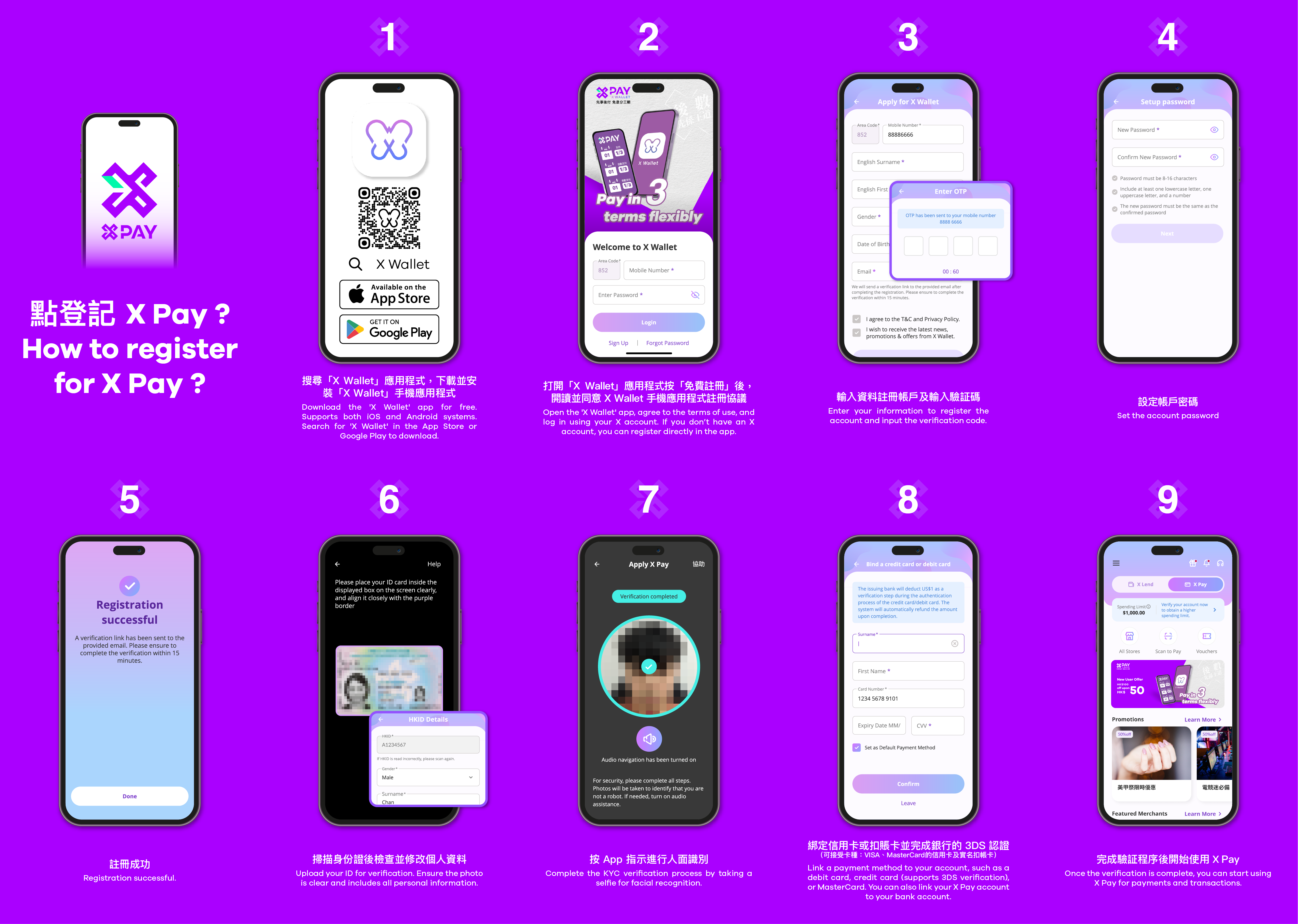
Just follow these 8 simple steps to easily activate X Pay and enjoy the flexible Pay Later payment method!
Download the X Wallet App — Search for "X Wallet" in the App Store or Google Play Store to download and install the application.
Register an Account — Open the X Wallet App, select "Register," enter your mobile number, receive the SMS verification code, set your password, and complete basic information entry.
Verify Your Mobile Number — Confirm and verify your mobile number.
Registration Complete — After successfully creating your account, you will enter the X Wallet main interface.
Complete Real-Name Verification — Use your mobile phone camera to capture your Hong Kong ID card, ensuring the image is clear and the ID information is accurate.
Perform Facial Recognition — Follow the instructions to use your mobile phone camera for facial verification. Ensure adequate lighting and avoid covering your face.
Bind a Payment Card — Enter your credit or debit card details (Visa/MasterCard), complete bank verification to ensure the card is usable.
Successfully Activate X Pay! — After registration and verification are complete, you can experience Buy Now, Pay Later with interest-free 3-installment payments at online stores and physical shops that support X Pay, managing your spending flexibly.
Important Notes
Eligibility: X Pay is currently available to Hong Kong residents aged 18 or above.
Identity Verification: Ensure the submitted ID card and facial recognition meet the requirements for smooth verification.
Payment Methods: Supports Visa/MasterCard credit and debit cards, or card binding via Apple Pay.
4. How to Use X Pay for Online Store Payments
On online stores that support X Pay, you can easily complete installment payments by following these steps:
Add Items to Cart — Select desired items and proceed to checkout after confirming your order.
Choose X Pay as Payment Method — On the checkout page, select "X Pay Buy Now, Pay Later" from the payment options.
Scan the X Pay Merchant Payment QR Code to Confirm Payment — Open the installed X Wallet App, scan the merchant's X Pay payment QR code, and enter the corresponding purchase amount.
Automatic Installment Payment — After confirming the payment, the system will automatically split the total purchase amount into three installments (purchase date, one month later, two months later) for deduction, with no additional action required from you.
5. Guide to Using X Pay Vouchers
X Pay periodically collaborates with partner merchants to launch exclusive discount and voucher campaigns, making your purchases more affordable and valuable. Below are the steps on how to use X Pay vouchers:
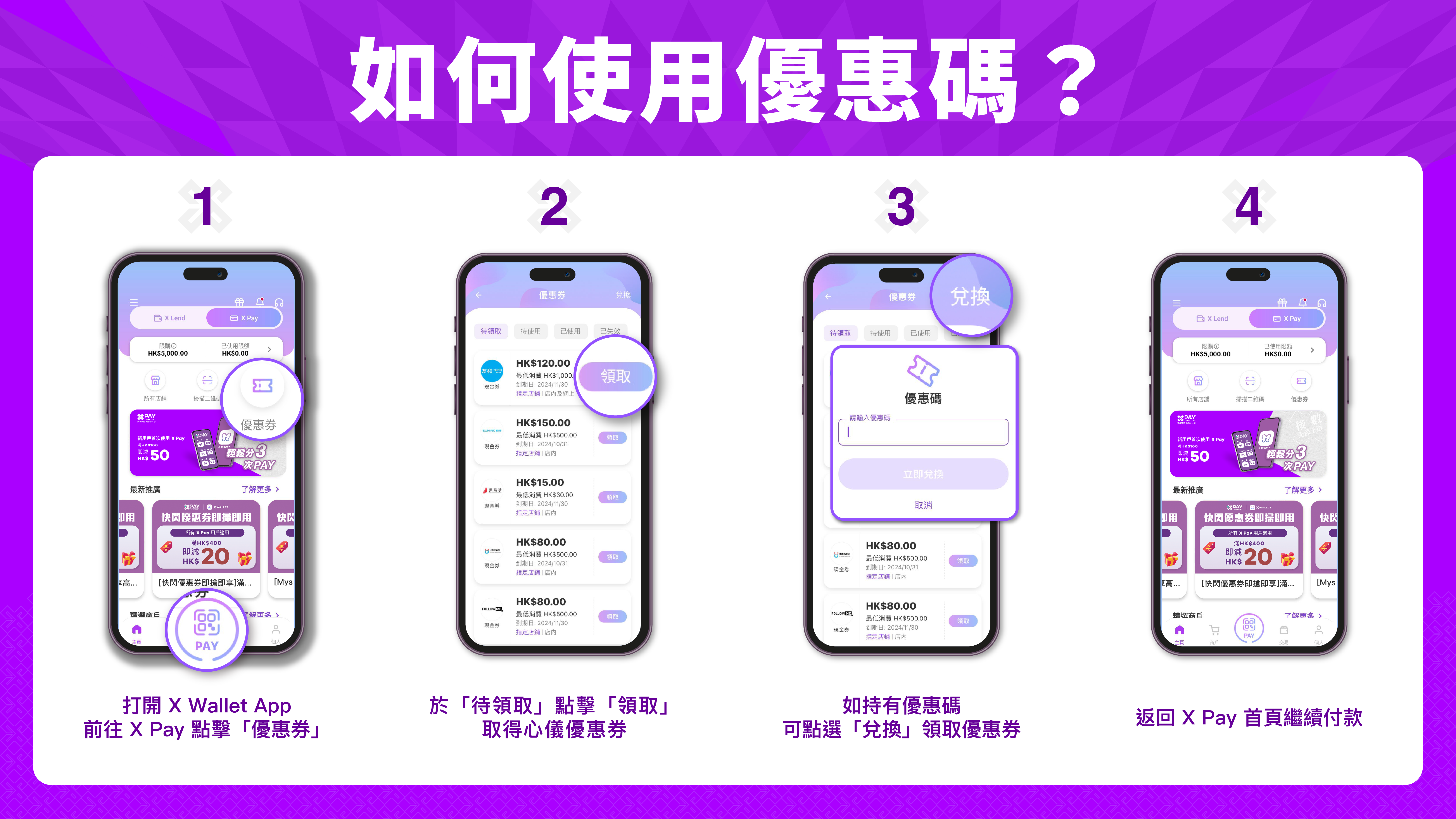
Claim Vouchers
Open the X Wallet App and go to the X Pay page.
Tap on "Vouchers," select your preferred voucher in the "Available" section, and tap "Claim."
If you have a promo code, you can tap "Redeem" to claim the voucher.
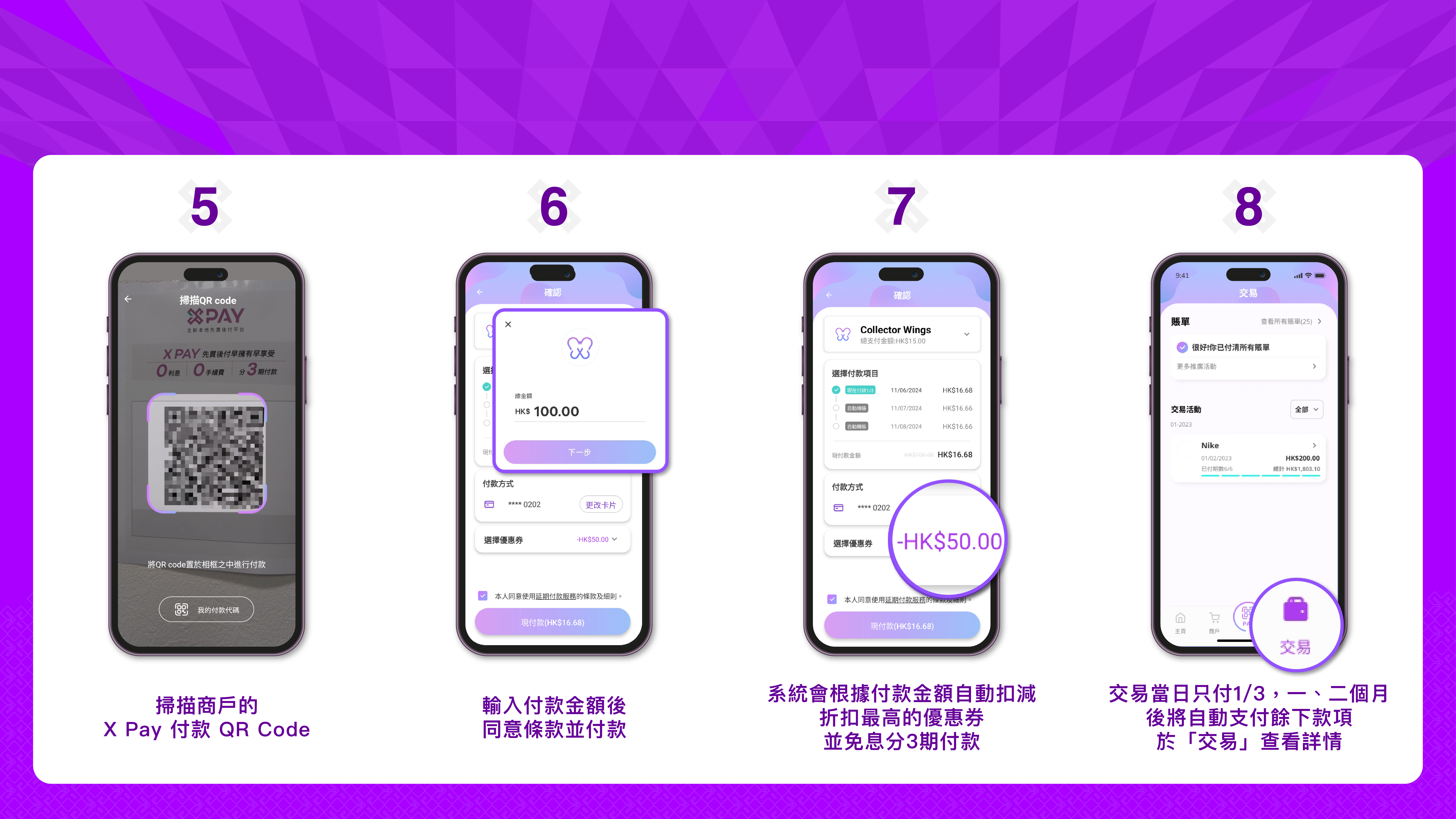
Make Payment with Vouchers
Return to the X Pay homepage and scan the merchant's X Pay payment QR Code.
After entering the payment amount, the system will automatically deduct the voucher with the highest discount.
Agree to the terms and complete the payment.
Installment Payment (Optional)
The system will automatically split the payment amount into 3 interest-free installments.
Only 1/3 of the amount is due on the transaction date, with the remaining payments automatically deducted over the next two months.
You can view detailed payment information under "Transactions."
By following these steps, you can easily use X Pay vouchers and enjoy a more economical shopping experience.
6. Frequently Asked Questions (FAQ)
Q1: What is X Pay?
A1: X Pay is an innovative payment tool provided by the X Wallet App, supporting the Buy Now, Pay Later function. It allows you to split your purchase into three interest-free payments instead of paying the full amount upfront. It is applicable for both online and physical merchants.
Q2: How does X Pay's installment payment work?
A2: Each purchase amount is automatically split into three payments:
First Installment: Purchase Date
Second Installment: One Month Later
Third Installment: Two Months Later
As long as you make each payment on time, you can enjoy 0% interest with no hidden fees.
Q3: Does X Pay charge any interest or fees?
A3: No charges! Using X Pay for installment payments involves 0% interest throughout, with no additional fees or hidden costs.
Q4: What payment methods does X Pay support?
A4: You can make payments by binding Visa or MasterCard credit/debit cards, as well as by binding cards via Apple Pay. This feature can be easily managed within the X Wallet App.
Q5: Is there a minimum spending requirement for using X Pay?
A5: Yes, the minimum transaction amount is HKD 15.
Q6: How are refunds handled for orders that have been split into installments?
A6: Please contact the merchant directly from whom you purchased the product to process the refund. After the refund is completed, the amount will be returned to your bound credit/debit card within a maximum of 5 working days.
Q7: How is X Pay different from traditional credit card installments?
A7:
Application Process: X Pay uses a no-credit-check, instant approval authorization, simplifying the process; whereas traditional credit card installments may require credit assessment.
Fees: X Pay offers 0% interest throughout with no hidden fees; traditional installments often involve interest and handling fees.
Payment Flexibility: X Pay supports multiple card binding for flexible payments; traditional installment plans are relatively fixed.
Q8: How can I contact X Pay Customer Service?
A8: If you have any questions, please email the X Pay Customer Service Department at: [email protected]
Activate X Pay now and enjoy a brand-new, zero-pressure Buy Now, Pay Later payment experience! Download the X Wallet App and activate X Pay to make every purchase easier and more reassuring.
About Us
BBE Appliance Professional Consultant
BBE Appliance Professional Consultant has 30 years of home appliance retail and buying advisory experience, serving over 200,000 Hong Kong households with practical tips on cooker hoods, ovens, cooktops, and home appliance selection and maintenance.